Capturing and reverse engineering a Bluetooth printer protocol
• Created by: Domonkos Poór
Around a year ago, I made the terrible choice of buying a Phomemo M221 thermal printer, and guess what? It only really prints from a phone, through their official app, which is downright terrible. Don't get me wrong: it does do all the things you expect, however it's riddled with ads, is massive, slow, and tries to lock you into their ecosystem. I wanted something lighter, and preferably open-source and mobile-native.
It became obvious that I'd have to make it myself, so I had to learn the protocol.
Two prior projects did this work before me, and my work would have been a hell of a lot harder without them;
- phomymo is a browser label designer, and it's essentially what I wanted to re-create in a mobile-native format.
- phomemo-tools is a CUPS driver and filter set that covers the wider Phomemo family.
Both are MIT licensed, and both are worth reading before you touch this hardware.
The device
The M221 is a label printer. It speaks Bluetooth Low Energy GATT, with the
print service at ff00, a write characteristic at ff02, and a notify
characteristic at ff03. It also carries a Bluetooth Classic identity,
and this is what we call foreshadowing.
Capturing the traffic
The idea was that since I knew the app used Bluetooth, I could just use developer settings on android to capture the packets sent between the official app "Phomemo Print Master" and the printer, then I could imitate what the app does, and get some results.
Android HCI snoop log
Android can record every HCI packet the Bluetooth controller sees. You enable
the log in developer options, run the vendor app, and the capture lands in a
bugreport under data/misc/bluetooth/logs/. The file is a
btsnoop capture, which Wireshark reads directly.
This method records the vendor app's own traffic, which is the thing you want. It captures both transports, so it does not matter whether the app uses BLE or Classic.
I wrote a small reassembly script. The capture is a list of HCI ACL fragments. The script groups them by connection and handle, reassembles the L2CAP frames, and extracts the RFCOMM (Radio Frequency Communications, a "cable replacement protocol") or ATT (Attribute Protocol) payloads. That gives you the byte stream the printer actually received. The vendor app uses Bluetooth Classic, so its payloads are RFCOMM under SPP (Serial Port Profile).
Browser-side capture
The other method is the browser: I had an agent whip up a minimal prototype web app,
based on the phomymo and phomemo-tools projects, that I could use from my phone to attempt prints.
Web Bluetooth runs in Chromium,
and bluetooth-internals shows the GATT (Generic Attribute Profile) database,
the advertisement data, and the connection log.
This way, the app itself recorded every write, every notification, and the timing between them.
At this point I could cross-compare them, and verify some assumptions. Turns out, while the prototype used BLE GATT, the official app uses Bluetooth Classic, and the printer accepts both.
The second source: decompile the APK
A capture shows you bytes. It does not tell you what they mean. For that I decompiled the vendor APK with jadx and read the print path.
The decompile and the capture agreed byte for byte. The app's M221 print method calls a compression routine (which turned out to be LZO), and the byte sequence in that routine matches the capture exactly.
The wire format
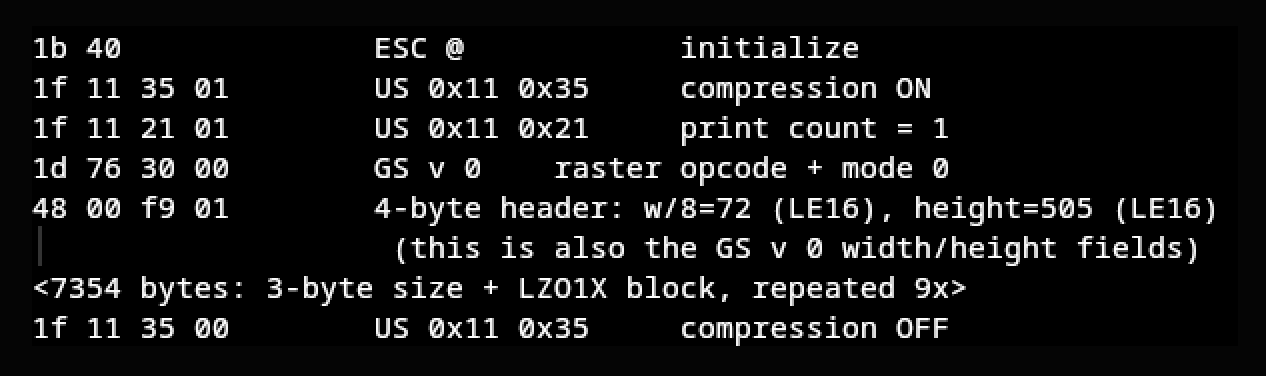
For an image print, the app sends:
1b 40              ESC @            initialize
1f 11 35 01        compression on
1f 11 21 01        print count = 1
1d 76 30 00        GS v 0, mode 0   raster opcode
48 00 f9 01        4-byte header: width/8 = 72 (LE16), height = 505 (LE16)
<compressed blocks>
1f 11 35 00        compression off
The raster pipeline is:
- Grayscale the image, apply dither.
- Bit-pack, MSB first, one bit per pixel, 1 means ink.
- Compress with LZO1X in blocks of 4096 input bytes.
- Prefix each compressed block with a 3-byte little-endian size.
- Prepend the 4-byte width and height header.
A 576 by 505 image is 36,360 raster bytes. After compression it was about 7,354 bytes, roughly a 5 to 1 reduction.
The traps
These are the parts that cost the most time. Most of them are general.
The device has two transports, and pairing binds the wrong one
The M221 advertises a Bluetooth Classic identity alongside its BLE services. The
Classic class is 0x00100680, which is a printer, with SPP and HID (Human Interface Device) in its EIR (Extended Inquiry Response).
On Linux, bluetoothctl pair binds the Classic identity. After that,
BlueZ tries Classic first on every later connect. The firmware accepts the link,
resolves services, and then drops it. The error is
br-connection-not-supported, and it appears even after you remove the device
and rescan.
Web Bluetooth is LE-only, but it inherits the poisoned Classic state. The symptoms are empty service discovery and a link-layer connection failure. My first mitigation, "pair at the OS level first", was itself the poison.
The working recipe is to remove the Classic bond, forget the device in
bluetooth-internals, and pair again from the application, which creates a
fresh LE-only bond.
The lesson: on a dual-transport device, an OS-level pair is not neutral. It changes which transport the stack prefers, and it can break the one you want.
The framing is not the decoder
My decoder failed on the real capture until I skipped the 3-byte block size headers. The bytes were correct, and the decoder was correct, but I fed the framing bytes into the decoder.
The lesson: when a decoder fails on real data but passes on test data, check the framing before you change the decoder.
Validate the decoder against a reference
Before I trusted my own decoder, I built the reference LZO library and ran its test harness. I decoded real output from the reference and compared it to mine until they matched exactly. Only then did I point my decoder at the capture.
The lesson: a reimplementation needs a reference. Byte-for-byte equality with the reference is the only proof that matters.
A false EOF marker
Early analysis found a 11 00 00 sequence just before the compression-off
command, and it looked like an end-of-file marker. It is not. It is the tail of
the final LZO stream, a match token, and the match is a coincidence.
The lesson: an unexplained byte pattern is a hypothesis, not a finding. Test it.
Small decode details
Two smaller notes from the same work:
- The battery characteristic
2a19is a raw percent byte. Decode it as a number, not as text. - The printer sends a
1a 0f 0cnotification about 1.6 seconds after the job completes. Its meaning is unknown. It is harmless and currently ignored.
Status
The protocol is validated on real hardware, and my own app prints byte-identical jobs from a browser and from a phone. The full project, a multi-platform label printer application, is still in progress and will be published when it is ready.